
Scams That Target Small Business Websites (and How to Spot Them)
If you run a business or a nonprofit, you're probably getting mail, email, texts and phone calls about your website that look official. Some of them are designed to look exactly like a bill or a warning from a company you already work with.
Falling for one of these doesn't mean you weren't paying attention. They're written by people whose full-time job is making them convincing, and with bad actors now employee AI agents for some of their schemes, they're getting more clever all the time.
Here are the ones we see most often, and what to do about each:
Here are the ones we see most often, and what to do about each:
1. Fake Domain Renewal Notices
What it looks like: A letter or email that reads like an invoice: "Domain Name Expiration Notice," your real web address, a due date and a price, often around $239 for a few years. It may come with a return envelope or a QR code.
Why it’s misleading: It isn’t from the company that actually holds your domain. Read the fine print and it often says “this is not a bill” or “this is a solicitation.” Paying it can move your domain to a new company at several times the normal price, and that can knock your website and email offline. The Federal Trade Commission took action against one well-known sender, Domain Registry of America, back in 2003 over notices that made a transfer look like a renewal. Mailers in this style are still showing up, often under official-sounding names.
What to do:
DON'T pay it, DON'T call the number, and DON'T scan the code.
Most domains renew for somewhere around $10–$30 a year. If you aren't sure who holds yours, ask us.
DON'T pay it, DON'T call the number, and DON'T scan the code.
Most domains renew for somewhere around $10–$30 a year. If you aren't sure who holds yours, ask us.
2. Vanity Awards and "Best Of" Plaques
What it looks like: "Congratulations! Your business has been selected Best Hairstyling Salon in Wake County for 2026!" To claim your plaque, certificate or press kit, you pay a fee.
Why it's misleading: There was no vote or judging. The same "award" goes out to thousands of businesses, picked from online listings. Real community awards, like a local newspaper's readers' choice, don't charge you to win.
One example many local businesses have received lately is a “Best of” postcard or email from BusinessRate, with a QR code to order a plaque or certificate. Rankings are based on public Google reviews, and the award itself is a product for sale. The Better Business Bureau’s BusinessRate profile and its tip on how to spot vanity awards are worth a read before you order.
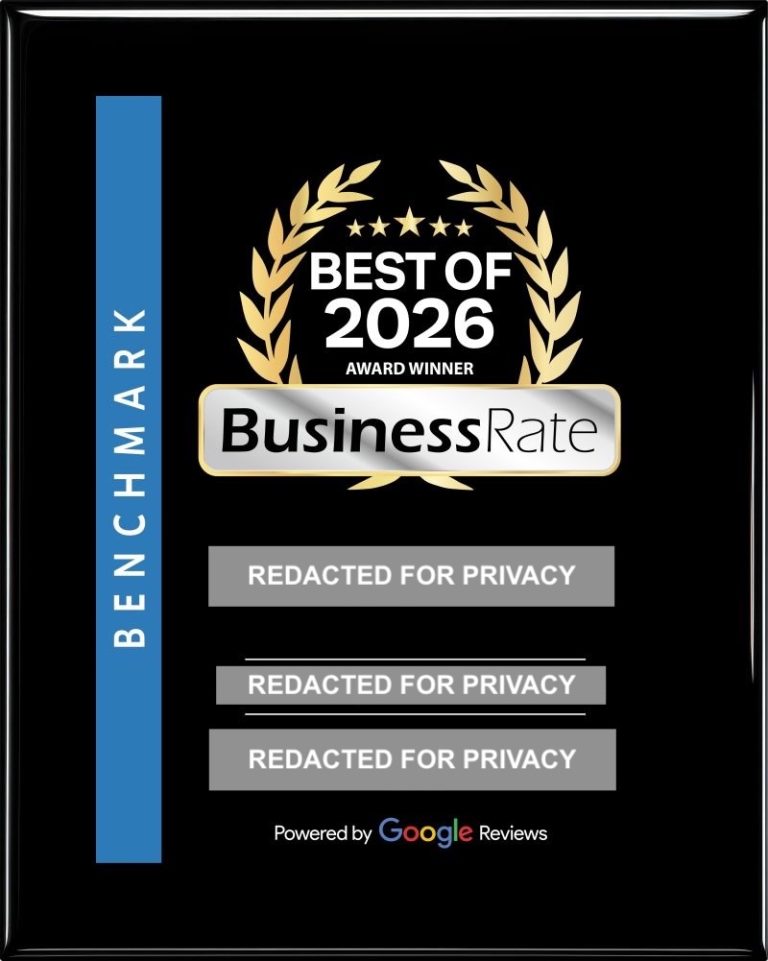
What to do: If an award asks for money, it's an ad. Ignore it unless you just want the plaque, and know that's what you're buying.
3. Fake Google Listing or "Google Verification" Calls
What it looks like: A call, often a recording, saying your Google listing is "unverified," "about to be removed," or "not showing up," and that you need to press 1 or pay to fix it.
Why it's misleading: Google DOES NOT cold-call businesses to threaten your listing, and setting up and managing a Google Business Profile is 100% free with Google. These callers are selling overpriced services, or trying to get access to your account.
What to do: Hang up. Don't give out codes that get texted to you to anyone who called you, because those can hand over control of your listing. If you're worried about your listing, we'll look at it with you.
4. Phishing Emails Disguised as RFPs, Invoices or Shared Documents
What it looks like: "Please review the attached RFP." "Invoice #4471 is overdue." "A colleague shared a document with you." Often there's a PDF attached, and inside it is a button that says "View Document."
Why it's misleading: The PDF itself is usually harmless. The link inside it takes you to a fake sign-in page for email, Microsoft or Google, built to capture your password. Scammers tuck the link in a PDF because email filters are less likely to catch it there.
What to do: If you weren't expecting it, don't click. Call the sender at a number you already have and ask if they really sent it. NEVER EVER type your password into a page you reached from an email link.
5. Fake SEO or "Your Site Has Errors" Cold Emails
What it looks like: "I was looking at your website and noticed 37 critical errors hurting your Google rankings." Usually from a Gmail address, often with a vague "free audit."
Why it's misleading: It's a mass email, and the sender most likely never looked at your site. The "errors" are generic, and the fix is an expensive package that may not do much, or in some cases may hurt your rankings.
What to do: Delete it, or forward it to us if it worries you. If something were really wrong with your site, you'd hear it from us first.
6. Fake Hosting, SSL or "Account Suspended" Emails
What it looks like: "Your SSL certificate expires today." "Your hosting account will be suspended in 24 hours." "Payment failed. Update your card now." There's a link to "fix it."
Why it's misleading: These are made to look like they came from your host, but the link goes to a fake page that collects your login or your card number. The countdown clock is there so you'll hurry.
What to do: Don't click the link. For Seaport clients, we handle hosting and security certificates, so if something really needed attention, we'd tell you directly.
A Quick Note on AI Email Assistants
If you use an AI tool to read, sort or answer your email, know that some phishing emails now carry hidden text: instructions written to the AI, not to you, telling it to click a link, reply with information, or forward messages. You might never see that text. Keep AI assistants from sending money, sharing passwords or forwarding mail without asking you first. See our guide on using AI safely.
The One Rule to Remember
If anything asks for money, a login, or urgent action about your website, domain or Google listing, forward it to us first. Checking is free for Seaport clients.
Send it to [email protected]. A photo of a letter works fine. We'd much rather look at a hundred harmless emails than have you deal with one bad one alone.
Frequently Asked Questions
I already paid one of these. What now?
Don't feel bad. It happens to careful people all the time. Contact us right away. We'll check whether your domain or accounts were affected and help you lock things down. You can also contact your bank or credit card company to either try and reverse the charges and ensure that they never charge you again.
How do I know who my real domain registrar is?
If you’re a Seaport client, just ask us and we’ll tell you where your domain is registered and when it renews. You can also look it up with a free WHOIS search, though the results can be confusing.
Does Google ever call businesses?
Google may contact you in some specific situations, for example about an ad account you set up yourself. But Google doesn't make robocalls threatening to remove your listing, and a basic Business Profile is always free.
I clicked a link in a suspicious email. Am I in trouble?
Not necessarily. If you didn't enter anything, you're probably fine. If you typed in a password, change it right away (and anywhere else you use it), then let us know so we can help check things over.
Are all cold emails about my website scams?
No, but most are sales pitches at best. A good rule: legitimate companies you work with will reach you through people and channels you already know. When in doubt, forward it to [email protected].
More guides for business owners
What AI is fine for, what never to paste in, email assistants, voice-cloning scams, and how to keep staff safe.
Know who manages your domain, hosting and Google accounts—and how to reach them if something changes.
Strong unique passwords, your browser’s built-in saver and two-step sign-in—without the scare tactics.
A calm checklist for the moment the site will not load, before you pay anyone for a “fix.”
Ownership, hosting, timelines and red flags, without the sales pitch.